Weather Forecast: Live Weather
- 4.8
- Rating
- 10.00M
- Installs
- Free
- Price
 Analysis by App-foxy
Weather apps become genuinely useful when they fit into the small decisions a household makes every day: whether to hang laundry outside, when to walk the dog, if children need a jacket, or whether a weekend plan should move indoors. I spent time using Weather Forecast: Live Weather with that kind of practical routine in mind, rather than treating it as a screen full of numbers. My overall impression is that it is a straightforward weather companion for people who want local conditions, hourly planning, daily outlooks, and radar in one place without paying to get started.
The app is developed by Weather Forecast - WaiWao Studio and sits in the weather category. It is free to install, aimed at Everyone, and runs on devices using Android 6.0 or later. Its current version is 1.115.0. Those details matter in a shared household because an older spare phone or a family tablet may still be part of the routine. I would still check how comfortably the interface fits the particular screen before making that device the household weather station, but the operating-system requirement is not especially demanding.
Its public reception is also notable: it holds a 4.8 average from around 163 thousand ratings, with roughly 6.9 thousand written reviews, and has passed 10 million installs. I do not treat popularity as proof that every forecast will suit every location, but it does suggest that the app has found a broad audience. The more useful question is whether its presentation works for the way you and the people around you actually make plans.
You May Also Like

 Blood Strike: 2.5 Anniversary
Blood Strike’s Loadouts Turn Every Drop Into a Tactical Gamble
A close look at Blood Strike’s custom loadouts: how fast access to signature weapons reshapes its battle royale rhythm, rewards preparation, and narrows the gap between fights.

 Pandora - Music & Podcasts
Pandora’s Music Is Easy to Start, but Harder to Recover
Pandora’s strength is its low-effort path from a seed to a station. Its weak spot is how much confidence it asks you to place in connection, setup, and quiet recovery.

 8 Ball Pool
 Is Built on Rivalries, Rematches, and Routine
A close look at the rivalries, rematches, shared routines, and unanswered safety questions that turn a quick pool match into a persistent mobile community.

 Samsung Music
’s Quiet Strength Is Playing What You Already Own
Its reach comes less from spectacle than from dependable access to a personal library. That simplicity is both the app’s strongest retention engine and its ceiling.

 AccuWeather: Weather Radar
AccuWeather Review: A Quick, Clear Forecast for Everyday Decisions
For everyday plans, the best forecast is the one you can understand quickly. AccuWeather makes rain timing, radar, and local conditions easy to act on, with a few trade-offs.

 Hill Climb Racing
Why Hill Climb Racing Still Turns Crashes Into One More Run
A tiny car, a bumpy hill and one more upgrade: Hill Climb Racing keeps resurfacing because its simple chaos makes every near-miss feel personal.
More From Our News Desk
View All News


How it works when several people share the same weather routine
In my experience, the best shared-device use is not handing the phone around every morning. It is keeping the app available on a common tablet, an older phone in the kitchen, or one family member’s device that everyone already checks before leaving. One person can look at the current conditions, another can inspect the hourly outlook, and someone planning a trip can use the radar view to judge whether rain is approaching. That makes the app more useful than a single glance at a temperature number.
A realistic example is a school morning followed by an outdoor appointment. I would first look at the current weather to decide what to wear, then move to the hourly view to see whether the wettest period overlaps with the walk home. If the timing is uncertain, the radar gives a more visual way to follow nearby precipitation. The advantage is not that it eliminates uncertainty; weather forecasts cannot do that. The advantage is that the household can discuss the same information instead of relying on different screenshots, memory, or a vague impression from outside the window.
That workflow also reveals a useful trade-off. A daily forecast is easier for a quick family conversation, while the hourly view is better for deciding when to leave. Radar is more helpful when conditions are changing than when you simply need tomorrow’s broad outlook. I would not use all three views for every decision. Opening the most relevant one keeps the routine quick and prevents the app from turning a simple question into unnecessary forecast checking.
For shared use, the app’s value comes from being understandable at a glance. A child can ask whether a coat is needed, a parent can check the timing of a commute, and an older relative can look at the day ahead without needing to understand technical weather terminology. I would still explain that a forecast is guidance rather than a promise, especially when plans depend on a narrow window of dry weather.
Setting it up without confusing everyone
The first setup should be done by the person who normally manages the shared device. That gives the household one consistent starting point for location and display choices, instead of having several people change the app before anyone has learned how it presents information. I prefer to begin with the main home location, check the current conditions against what is happening outside, and then add other places only when they serve a clear purpose, such as a workplace, school, or frequent travel destination.
That boundary is important because a crowded list of locations can make a simple morning check slower. If every relative’s town or every possible holiday destination is saved, the most relevant place may no longer be obvious. I would keep the shared device focused on the household’s primary location and use a personal phone for less frequent destinations. This is one of the small habits that makes a weather app feel reliable in practice: the screen should answer the household’s immediate question first.
Location handling deserves a little thought on a shared device. If the tablet stays at home, a fixed home location is usually easier for everyone to understand than expecting each person to adjust it. If the device travels between homes, workplaces, or trips, I would make a clear rule about who updates the location and when. Otherwise, the forecast may be perfectly readable but relevant to the wrong place. That is a coordination problem, not necessarily a forecasting problem.
I also recommend agreeing on what each part of the app is for. The current view answers “what is it like now?” The hourly forecast answers “when should we go?” The daily outlook answers “what kind of day is ahead?” The radar answers “is the nearby situation changing?” Teaching those four questions is more useful than simply telling someone to open the app. It gives children and older family members a repeatable way to interpret the information.
The free starting point is another reason it can work for a household that does not want to commit immediately. There are in-app purchases priced from $2.99 to $4.99 per item, so I would treat any paid option as an individual decision rather than assuming everyone needs it. On a shared device, the person responsible for purchases should review what is being selected before confirming anything. That keeps the basic weather routine separate from optional spending.
Coordinating plans with the hourly view and radar
The hourly forecast is the part I would use most for coordination. Daily summaries are useful for broad planning, but they can hide the difference between a dry morning and a wet afternoon. When several people have different schedules, that distinction matters. A household can choose a departure time, move an errand, or decide whether outdoor equipment needs protection by looking at the hours around the event rather than treating the whole day as one block.
Radar adds a different kind of information. I find it most helpful when someone asks, “Is that rain likely to reach us soon?” rather than “Will the entire day be rainy?” Watching the movement of nearby weather can support a short-term decision, such as waiting before walking somewhere or taking an umbrella for a trip that cannot be delayed. It should not be mistaken for a guarantee about a precise street or minute, so I would combine it with the hourly outlook and what is visibly happening outside.
A less obvious but useful household habit is to check the forecast at the moment a plan is made and again shortly before leaving. The first check helps choose a plan; the second catches changing conditions. I would not keep refreshing constantly, because that encourages false confidence in tiny changes. The app works better as a decision aid than as a live scoreboard that must be watched all day.
For shared coordination, screenshots can be convenient, but I prefer speaking in terms of the relevant time window: “The rain looks more likely around the school run,” or “The afternoon appears more suitable for the garden.” That keeps the conversation focused on the decision instead of making everyone interpret a full screen independently. It also helps when one household member is using a different weather source, since the discussion can compare the practical conclusion rather than competing over isolated numbers.
There is a limit here. A weather app cannot replace local judgement in situations where conditions change rapidly or safety is at stake. If a family is planning a long hike, a drive through severe weather, or an activity affected by official warnings, I would consult appropriate local authorities as well. Weather Forecast: Live Weather is convenient for everyday planning, but I would not make it the only source for high-consequence decisions.
Age, trust, and the limits of a shared screen
The Everyone content rating makes the app suitable in age terms for a broad household audience. That does not mean every user will interpret forecasts in the same way. A young child may see a rain symbol as a certainty, while an adult understands it as an indication of likely conditions. I would use the app as an opportunity to explain uncertainty in simple language: a forecast helps us prepare, but we still look outside and stay alert to changes.
That lesson is particularly valuable with radar. Its visual movement can feel more exact than it really is. I would show a child how to use it to answer a broad question, such as whether rain is moving toward the area, rather than encouraging them to treat the edge of a colored pattern as a guaranteed boundary. This is a practical trust rule: the clearer the visual, the more important it is to explain what it cannot promise.
On a shared device, I would also separate convenience from privacy expectations. A household location is useful for a common tablet, but a personal phone may be better for someone who does not want their routine mixed with everyone else’s. The app can support shared weather checking, but it should not be treated as a substitute for sensible account and device boundaries. Each person should know whether they are viewing the home forecast or changing the location for everyone else.
There is no need to make the app a formal family-management system. Its strength is narrower and more practical: putting forecast information in a place where people can consult it together. If you need detailed parental controls, separate profiles, or tightly managed personal information, I would choose a platform designed around those needs instead of expecting a weather tool to provide them.
Trust also depends on resisting overconfidence. The high average rating and large install base make the app look reassuring, but neither tells me that every location will receive equally useful results in every situation. Local geography, rapidly changing conditions, and the quality of the underlying forecast all affect the experience. I like the app most when I use it to prepare sensibly, not when I ask it to settle every uncertainty.
Where it fits beside other weather options
Compared with the default weather widget that comes with many phones, this app feels more useful when I want to move beyond a single current-temperature glance. The combination of local conditions, hourly planning, daily outlooks, and radar gives a household more ways to answer practical questions. The trade-off is that another app means another interface to learn, and people who only check the temperature before leaving may not gain much from switching.
Compared with highly specialized weather services, it takes a more approachable route. Someone who needs detailed meteorological layers, advanced forecasting tools, or professional-grade interpretation may prefer a specialist product. I would also look elsewhere if my main need were a very specific activity such as aviation, sailing, or mountain forecasting. This app is better suited to ordinary routines where clarity and convenience matter more than technical depth.
It also sits between a simple daily forecast and a constantly monitored radar tool. The daily view is easier for planning tomorrow, while the radar and hourly screens become more valuable as the event gets closer. That layered approach is its strongest practical quality. I can use a broad view when I am making a loose plan and switch to a more immediate view when timing matters.
One limitation is that shared use can make a general-purpose interface feel less personal. A frequent traveler may want several locations, while a household tablet should probably stay centered on home. A person who wants a widget or an especially compact glanceable experience may prefer the phone’s built-in option. I would choose this app when the household values a fuller forecast conversation, not simply the smallest possible weather display.
Who should use it, and who should skip it
I would recommend it to people who regularly make plans around changing weather and want current conditions, hourly timing, daily context, and radar together. It is a good fit for households coordinating school runs, errands, walks, gardening, sports practice, or short trips. It is also approachable for someone who has outgrown a basic temperature widget but does not want a technical weather workstation.
The app is especially practical on a shared Android device because its purpose is easy to explain: check the place, choose the relevant time view, and use the result to make a sensible plan. The free entry point lowers the barrier to trying that routine, while the Everyone rating makes it comfortable to introduce across age groups. I would still keep optional purchases under the control of the household member who manages spending.
I would skip it if you need specialized forecasts, formal warnings as your only safety source, or a deeply personalized system with strict account separation. I would also skip it if your current phone widget already answers every question you ask and you never need hourly timing or radar. Installing another weather app only makes sense when its additional views solve a real problem.
My household verdict
After using Weather Forecast: Live Weather as a planning tool rather than a novelty, I see it as a solid choice for everyday coordination. Its best quality is the way its views support different decisions: current conditions for leaving now, hourly details for choosing a time, daily information for broad planning, and radar for watching nearby changes. That combination gives a shared household a common reference without requiring everyone to become a weather expert.
I would set it up with one clear home location, keep the saved places focused, explain the difference between forecast guidance and certainty, and use the radar as a short-term aid rather than a promise. Those small boundaries make a noticeable difference. They prevent the shared device from becoming cluttered and help younger or less confident users understand what they are seeing.
The app is free, carries an Everyone content rating, and comes from Weather Forecast - WaiWao Studio. Optional in-app purchases range from $2.99 to $4.99 per item, so I would try the basic experience first and decide carefully whether any paid addition is worthwhile for the person using it. For most families, the important question is not whether every feature is needed, but whether the app improves the decisions they already make.
My final recommendation is simple: choose it if you want a readable, multi-view weather tool that can support shared daily planning. Keep a different source available for serious weather risks or specialized activities, and choose a simpler built-in widget if all you need is a quick temperature glance. For a household that wants to coordinate around rain, timing, and outdoor plans, Weather Forecast: Live Weather offers enough depth to be genuinely useful without becoming difficult to explain.
FAQs for Weather Forecast: Live Weather
01What features does Weather Forecast: Live Weather offer?
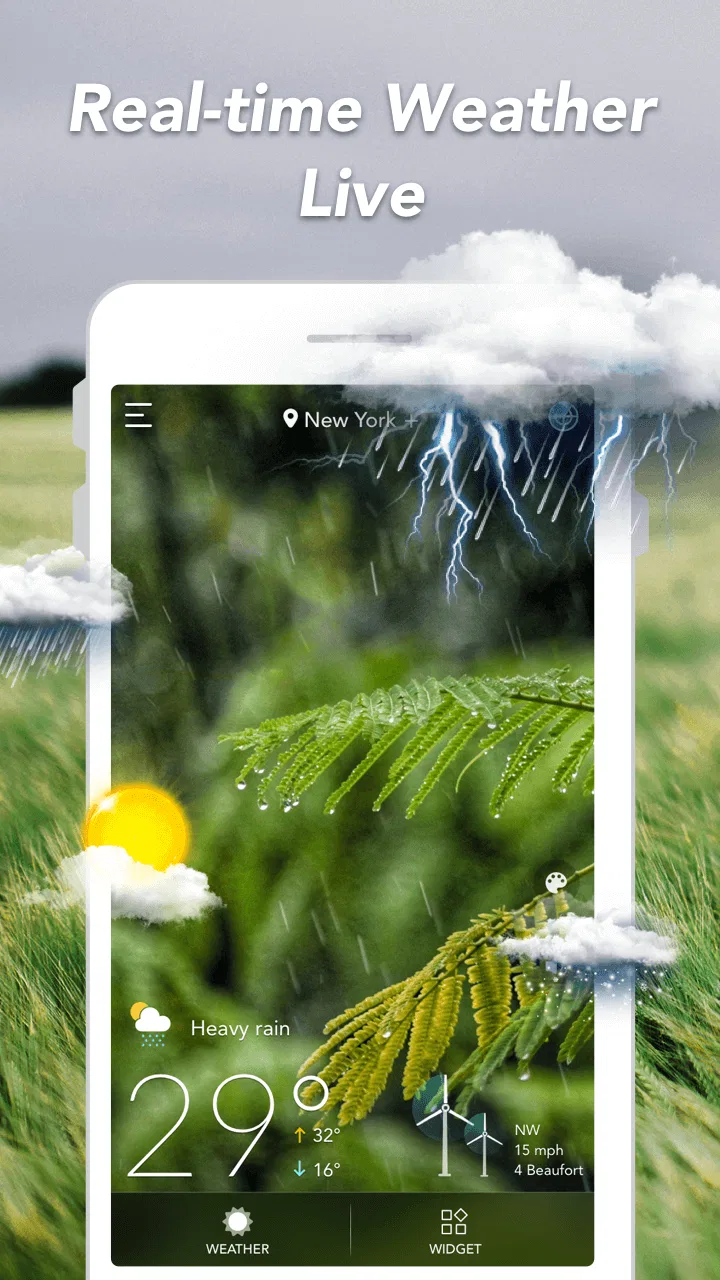
Weather Forecast: Live Weather provides real-time weather updates, including temperature, humidity, wind speed, and precipitation forecasts. Users can view hourly and 7-day forecasts, as well as detailed radar maps. The app also offers severe weather alerts to keep you informed of any hazardous conditions.
02Is Weather Forecast: Live Weather free to use?
Yes, Weather Forecast: Live Weather is free to download and use. However, it offers in-app purchases for additional features such as ad removal, advanced radar views, and custom alerts. These premium features enhance the user experience by providing more detailed and uninterrupted forecasts.
03How accurate is the weather data provided by the app?
Weather Forecast: Live Weather sources its data from reputable meteorological services, ensuring a high level of accuracy. The app frequently updates its information to provide users with the most current weather conditions and forecasts. Users have reported satisfaction with its precision and reliability.
04Can I customize the notifications in Weather Forecast: Live Weather?
Yes, the app allows you to customize notifications based on your preferences. You can set alerts for specific weather conditions, such as rain or extreme temperatures, and choose the frequency of updates. This helps you stay informed about the weather conditions that matter most to you.
05Does Weather Forecast: Live Weather require an internet connection?
Yes, an internet connection is required for Weather Forecast: Live Weather to provide real-time updates and accurate forecasts. While some data may be temporarily accessible offline, for the most reliable and current information, a stable internet connection is recommended.
Pros
- Accurate real-time updates
- User-friendly interface
- Detailed weather maps
- Customizable alerts
- Supports multiple locations
Cons
- Ads can be intrusive
- Requires internet connection
- Limited free features
- High battery usage
- Occasional loading delays

Weather Forecast: Live Weather
Gallery